
AWS SQS desktop client for macOS and Windows
Search, inspect, and safely manage AWS SQS messages.
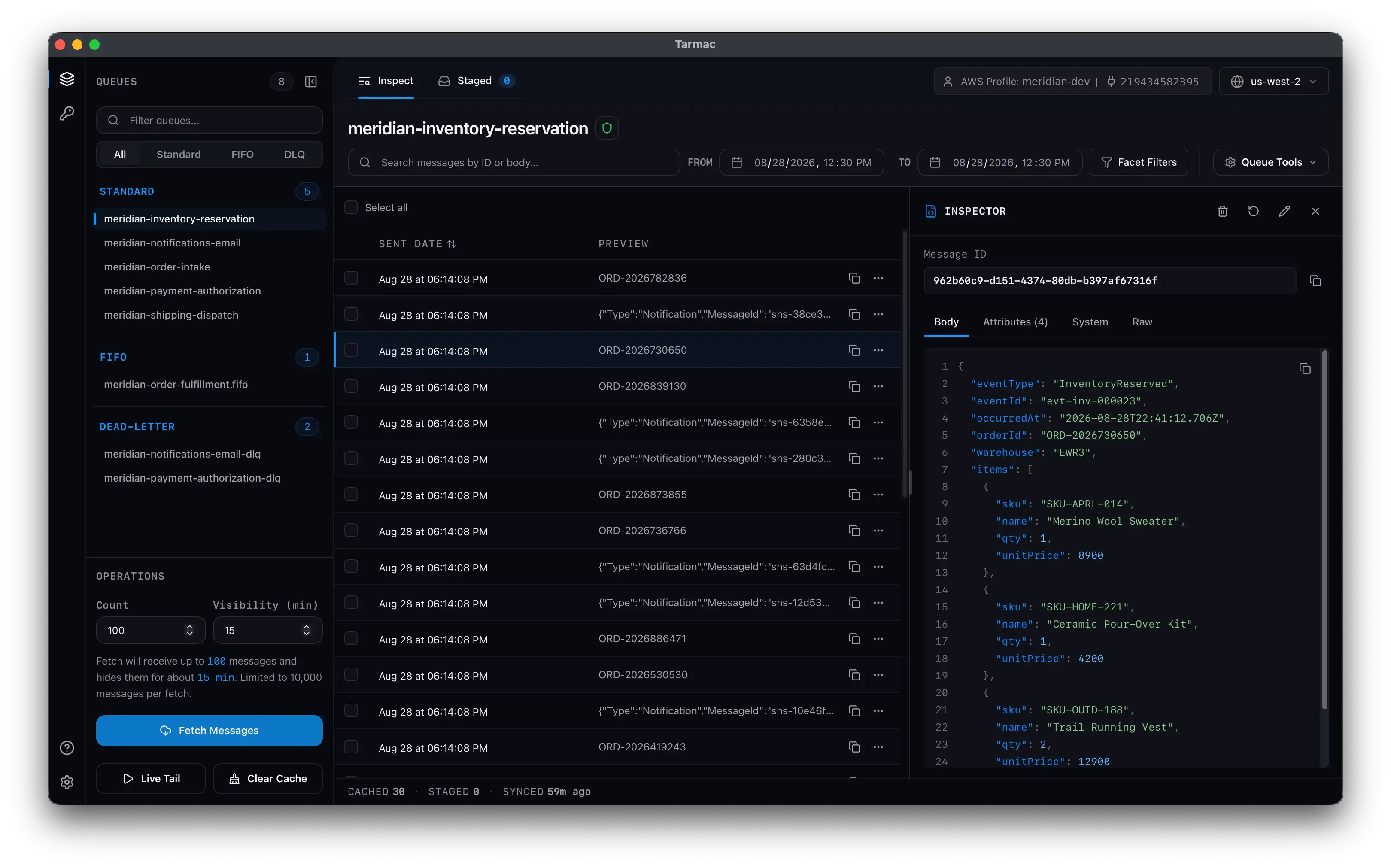
The next DLQ incident is not another console session. Pull the queue down once. Search and inspect it locally. Stage every change, then publish the batch.
macOS · Windows · Free read-only usage
The problem
SQS has no peek API.
The only way to read a message is to receive it, which puts it in flight for the visibility timeout and increments its receive count. Looking is not free, and the console doesn't do much past polling.
That leaves you in a few familiar spots:
No search over a queue.
The console gives you no full-text search over a body, no filter over attributes, and no cross-message view.
No way to keep what you saw.
A receive hides the message behind the visibility timeout and gives you nothing to keep. Want to see it again? Re-poll, and wait for the timeout to lapse first.
Every mutating action runs immediately.
In the console, delete, requeue, and resend hit the live queue the moment you confirm, one message at a time. No batch to review. On a production DLQ, every click is a live mutation.
The solution
Receive once, read from your machine after.
Working on a specific slice of a DLQ is nearly impossible in the console. Here, you pull the queue down once and slice it however you need. Stage deletes, redrives, resends, and edits. Publish the batch when you're ready.
Search the cache, not the live queue.
Full-text, date range, and facet filters run against messages already on your machine. SQS has no search.
Search & filtering docsInspect messages without re-receiving.
Open a body, attributes, system metadata, and raw JSON. SNS envelopes and S3 payloads get their own tabs.
Message inspector docsStage every change before it runs.
Deletes, sends, edits, and per-message redrives wait in a batch. Publish once and read success, skipped, or failed per message.
Staged actions docsDLQ redrive without copying ARNs.
Tarmac finds the source queue, carries FIFO group and dedup IDs, and stages the send and delete together.
DLQ redrive docsHow Tarmac compares with the AWS SQS console and scripts
The console handles a single receive. A script handles the one operation you already know. Tarmac keeps the investigation, the review, and the publish in one place.
| Workflow | AWS console | One-off script | Tarmac |
|---|---|---|---|
| Reinspect messages | Receive them again | Build persistent storage | Read from the local cache |
| Search bodies and attributes | No full-text or faceted search | Build parsing and indexing | Full-text, date, and facet filters |
| Review mutations | Confirm one live action | Build dry-run state | Stage and review the batch |
| Understand outcomes | Inspect each operation | Build result reporting | Success, skipped, or failed per message |
How it works
Four steps from credentials to publish.
- 01
Connect with the AWS setup you already have.
Point Tarmac at an AWS profile in ~/.aws/credentials, env vars, or SSO.
- 02
List queues and pull messages into the cache.
Queues group into Standard, FIFO, and Dead-letter. Fetch puts messages in flight for the timeout you set. Nothing is deleted.
- 03
Search, filter, and inspect from the cache.
Full-text, date range, and facets run locally. Open any message for the parsed body, attributes, system metadata, and raw JSON.
- 04
Stage, review, publish.
Deletes, edits, and redrives wait in the Staged tab. Publish once, then read the per-message result.
Pricing
Free to inspect. Pro to change queues.
Start in Free. Choose an annual Pro plan inside the app when you need to change a queue.
Free
List queues, fetch and inspect messages, search the cache, and use Live Tail.
Pro, 1 device
One person, one machine. Delete, send, redrive, and publish staged changes.
Download TarmacPro, 2 devices
One person, two machines. Use it on a laptop and a desktop.
Download TarmacTeam
A key per teammate. Seats 1–9 are $99/year, then $79. Invite and bill at checkout.
Download TarmacNeed to change a queue? Choose Pro in the app. Card required. First-time trials get 14 days before the annual charge. Full terms in the docs.
Frequently asked questions
What can I do with Tarmac Free?
You can list queues, fetch and inspect messages, search the local cache, and use Live Tail. Delete, send, redrive, visibility changes, and staged actions need Pro. Fetch and Live Tail still receive messages, so they hide them for the visibility timeout and increment receive count.
Which platforms does it run on?
macOS (Apple Silicon and Intel) and Windows (MSI or Setup .exe). Linux (Coming soon).
Where do my AWS credentials go?
Tarmac uses the same AWS SDK chain as the CLI: env vars and ~/.aws profiles. Profile and environment modes keep secrets in memory for the session. The keychain holds only your Tarmac license key. Custom-endpoint and LocalStack mode is the only place you type keys into the app, and those are not saved.
Can you search AWS SQS messages without repeatedly receiving them?
Yes, after the first fetch. Search, filter, and re-inspect run against the local cache. The initial fetch is a real ReceiveMessage: the message goes in flight for your visibility timeout and its receive count goes up. Nothing is deleted. After that, you read it locally.
How can I inspect and redrive individual AWS SQS DLQ messages?
Fetch once into the cache, inspect and filter, then stage a send back to the source queue. Tarmac resolves the source through ListDeadLetterSourceQueues and carries FIFO group and dedup IDs. The original deletes only after the send succeeds, and only when you publish.
Does Tarmac Live Tail drain an AWS SQS queue?
No. It polls every three seconds and receives one message per tick. Use it to confirm traffic and catch new shapes, not to capture every send.
Is Tarmac Pro a subscription?
Yes. Pro is $99/year for one device or $149/year for two. Team seats 1–9 are $99 each, then $79. Each teammate gets a one-device key. Tax and totals are at checkout.
How does the Pro trial work?
Start it from checkout in the app. First-time eligible customers get 14 days with a card on file and no charge at start. The annual plan starts on the date checkout shows unless you cancel. Prior trial users may be charged immediately. Ending Pro returns you to Free.
Does Pro need to check in online?
Tarmac checks the license at activation, at launch, once per 24 hours while open, and when you Retry. It never checks on an AWS call. If the license service is unreachable, a last-known grant can last up to seven days. A definitive denial ends Pro immediately.
Find the message. Fix the batch. Move on.
Start free. When you need to change a queue, upgrade to Pro in the app.